Showing posts with label facebook. Show all posts
Showing posts with label facebook. Show all posts
Saturday, July 16, 2011

In April of 2010, Facebook allowed companies to place the "like" button on any page on their website. Since then, the "like" has become a recognized metric of social media marketing success. Many marketers have become obsessed with increasing the "likes" that their brand receives, and although it is a good first step, it should by no means be the end goal. At the end of the day leads and customers are what you're after, and if someone's only interaction with your brand is clicking the little thumb then you still have a lot of work to do.
Keeping your fans engaged is what's going to help you generate leads and eventually customers. Here are a few ways to capture your fans attention once you get them to "like" your brand and they're on your Facebook page.
Read Complete Article : →
Friday, July 15, 2011
These are some points that will help you to choose that which one is best ! Comment below and tell us about your Choice !
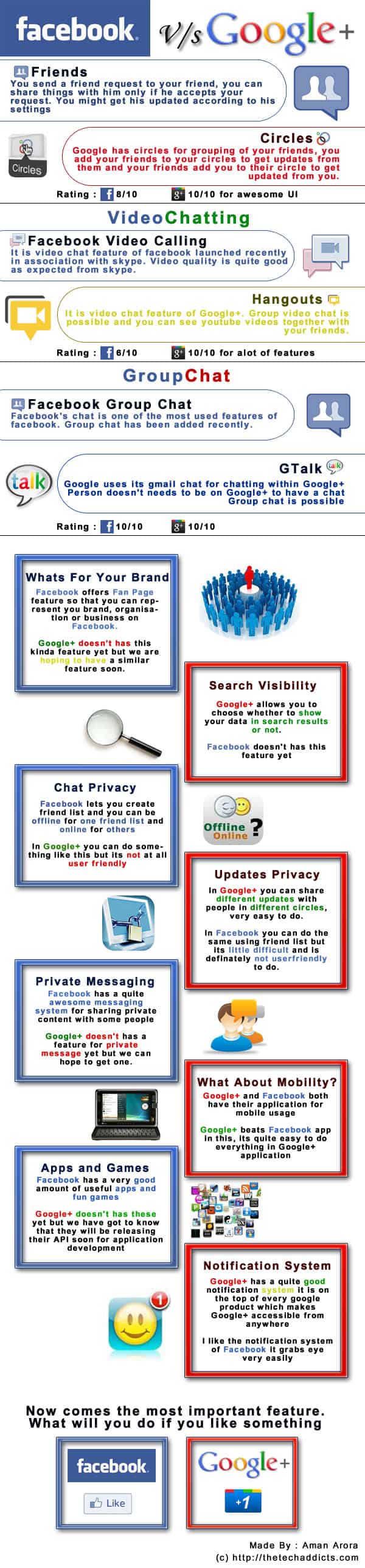
Click on the Pic to view in Full Size
Source : The Tech Addicts
Saturday, July 9, 2011
Facebook and Skype - Facebook video call

Video Calling
Talk to your friends face to face.
Read Complete Article : →

Facebook has launched their new chatting style recently but in my thinking Facebook is trying to make its popularity on its right place because Google is launching a new social networking site Google+ and it will surely give an outstanding competetion to Facebook in every way
Read Complete Article : →
Monday, July 4, 2011
Facebook - Groups Notification at One Place

Will Facebook compete Google+ ?? Read Below to Read about this Feature of Facebook!
Friday, June 3, 2011
Where-ever you go these days, the talk is related to ‘Facebook’! Yes, again it’s Facebook but this time it is based as a storyboard of a new song. It is ‘Facebook Love Story’ by Asim Subhani. This guy is on cloud nine after releasing 2 songs earlier this year (‘O jaan-e-jaan..’ and ‘Tere Liye’). An article featured in fashion magazine ‘Me & My Wedding’ reads, “Word ‘Superstar’ has a new synonym – ‘Asim Subhani’ … Soon the echoes of Asim Subhani will rock through the cities of Pakistan, and there will be no one stopping the show”. 100% Agreed! While the whole music industry is focusing more towards ‘Rocking’ the crowd with ‘Rock’, there are quite a few daring names who have shown their courage to win the hearts of people rather than hypnotizing them to the beats of rock and this guy seems to be surely one of them.

Friday, May 27, 2011

Wikileaks founder Julian Assange says that “ Facebook in particular is the most appalling spying machine that has ever been invented” and claims that “Here we have the world’s most comprehensive database about people, their relationships, their names, their addresses, their locations, their communications with each other, their relatives, all sitting within the United States, all accessible to US intelligence. ”
Wednesday, May 11, 2011
Starting today, people have the ability to tag Pages in their photos on Facebook in the same way they can tag their friends. Photo tagging for Facebook Pages enables people to share richer stories with friends about the things they interact with in the real-world, such as businesses, brands, celebrities, and musicians.
A Page can be tagged anywhere that someone can view a photo in the photo viewer. These photos will appear on the Photos tab on the Page, and not on the Wall. In addition, a Page can be tagged by anyone on Facebook, not just people who have Liked your Page.

For now, only Pages within the Brands & Products or People categories brands, can be tagged in photos. We're looking to expand this functionality to more Page categories over time.
To tag a single photo you are viewing:
- Click the photo you wish to tag and select "Tag This Photo" below the photo.
- Type the name of the people or product Page you wish to tag.
- Repeat this process for every Page in the photo that you would like to tag.
- Click "Done Tagging" in the bottom left corner.

The privacy of the photo is always respected when a Page is tagged in a photo. If a photo post is published to “everyone,” then it can appear publicly on the Photos tab of the Page and the Page admins can see it. If it’s just published for someone’s friends, only their friends will be able to see that photo. Page Admins can always choose to disable tagged photos from appearing on the Photos tab by going into Edit Page > Posting Options > and unchecking “Users can add photos”.

- :3 - :o - :) - :( - :D - :p - :v:putnam: - :/ - :42: - ^_^ - (^^^)- <(") - :|] - >:) - :* - :'( - <3
1: Want to make your text bold in Chat ?
2: Want to make your text bold + underline in Chat ?
3: Want to make your text underlined in chat ?Bold your Text in Facebook Chat :
Its very simple just add * before and after your text / sentence in Chat like this
*Hii This is XnYs* = Hii This is XnYs
Unerline your Text in Facebook Chat :
Its very simple just add _ before and after your text / sentence in Chat like this
_Hii This is XnYs_ = Hii This is XnYs
Bold + Underline your Text in Facebook Chat :
Just add *_ before and after your Text like this
*_Hii This is XnYs_* = Hii This is XnYs
These are the facebook smileys which people uses most during their chat conversation!
Facebook only ..!
Just try these in your chat conversation and feel cool !
Sunday, May 8, 2011
A Complete Guide for New Facebook users by - Kent Joshi
 | |
| Using Facebook by Kent Joshi |
An Introduction to Facebook
> Setting Up Your Facebook Account and Profile
> Finding and Adding Friends
> Communicating with Your Friends
> Keeping Up to Date with Your Friends
> Safeguarding Your Information on Facebook
> Publishing Photos
> Publishing Videos
> Your Mobile Access to Facebook
> Joining and Creating Groups
> Joining and Creating Events
> Buying and Selling with Facebook Marketplace
> Using Facebook Applications
Saturday, April 30, 2011
Facebook has launched its new .. It is Better then the old system ..
Have a Look on These Below ..!!


Want this to your acount ???
Go to Here :
Click on " Request an Invitation " Button
Wednesday, April 27, 2011
The Send Button, Because Sometimes It’s Private
Just over one year ago, we introduced the Like button to help people share worthwhile things with all their friends. But there are many times when people want to share something with just certain people. So today, we’re introducing the Send button, the easiest way to privately share things with groups and individuals.
How It Works
The Send button is a social plugin that websites can use to let people send a link to a friend through Facebook Messages, post it to a Group, or email it to an individual. For example, if you see a Mother's Day gift idea on 1-800-Flowers.com, you can now send a message or email to your family members to discuss. Or say you're training for a marathon and you come across a great article about running shoes on The Huffington Post. Now you can share it with your entire running group in just one click.
The Send button is a social plugin that websites can use to let people send a link to a friend through Facebook Messages, post it to a Group, or email it to an individual. For example, if you see a Mother's Day gift idea on 1-800-Flowers.com, you can now send a message or email to your family members to discuss. Or say you're training for a marathon and you come across a great article about running shoes on The Huffington Post. Now you can share it with your entire running group in just one click.
The Send button drives traffic by letting users send a link and a short message to the people that would be most interested. They don't need to leave the web page they’re on or fill out a long, annoying form. Compared to the alternatives, the Send button has fewer required steps, and it removes the need to look up email addresses by auto-suggesting friends and Groups.

We designed the Send button to be used alongside the Like button. By including both on your website, people will have ability to broadcast the things they like and also send it to specific people.
How to Add the Send Button
The Send button can be easily added to existing Like buttons or as a standalone feature. Developers currently using the XFBML Like button can include the send="true" attribute in their Like button code to generate a combined button, and those using an iFrame version of the Like button will need to upgrade to XFBML to display a Send button. The following code will generate a combined Like and Send button:
The Send button can be easily added to existing Like buttons or as a standalone feature. Developers currently using the XFBML Like button can include the send="true" attribute in their Like button code to generate a combined button, and those using an iFrame version of the Like button will need to upgrade to XFBML to display a Send button. The following code will generate a combined Like and Send button:
<div id="fb-root"></div>
<script src="http://connect.facebook.net/en_US/all.js#xfbml=1"></script>
<fb:like href="example.com" show_faces="true" width="450" send="true">
</fb:like>
Developers can add a standalone Send button with the following code:
<div id="fb-root"></div>
<script src="http://connect.facebook.net/en_US/all.js#xfbml=1"></script>
<fb:send href="example.com"></fb:send>
Learn more about adding a combined Like and Send button or just the Send button. Also, we strongly recommend using Open Graph meta tags on your web pages to control the title, description and image displayed when people use the Send button.
Real-time Metrics
In the coming days, we will provide real-time metrics for the Send button in the Insights Dashboard. Once youclaim your domain, you will be able to access the number of Send button impressions, messages, and referral clicks sent to your site.
In the coming days, we will provide real-time metrics for the Send button in the Insights Dashboard. Once youclaim your domain, you will be able to access the number of Send button impressions, messages, and referral clicks sent to your site.
We launched the Like button a little over one year ago, and it is already on millions of sites across the web. The Send button is launching on 50 sites today, and we look forward to seeing the list grow in the coming weeks. We're excited to offer people an easy way to share with small groups of people and give developers a new way to generate engagement and drive traffic to their websites.
Abe, an engineer on Facebook Platform, is sending this to his mom and all his friends.
 |
Tuesday, April 19, 2011
Now a days many facebook accounts being hacked by some anti-Islam and using it in wrong ways. Once they hacked they never change the original password. But they will enter a new email to recover the password if the password changed by the owner.
Please check your account now and look well whether any new email has been entered. If you see any email please remove it.


Like Us On Facebook

Sunday, April 17, 2011
Name Change Limit ReachedSorry! You've updated your name the maximum number oftimes allowed and your name can't be changed again. To list another name you go by, such as a maiden name, please use the Alternate Name field below.
Having this Message??
want to Fix it up??
Bypass Facebook Name Change Limit
Subscribe to:
Posts (Atom)


